
Studio: A Workshop for Coding Agents
The small tools behind my workflow for deciding, executing, editing, and publishing work with AI.
A patch is only one artifact. The decision behind it, the evidence that it works, and the feedback that follows still need owners.
An agent can produce a patch that passes tests. The harder part begins when the work leaves that one conversation. I open a plan in Neovim. A second agent needs a separate checkout. A review finds code that works but is painful to read. GitHub responds after I’ve moved on to something else.
Those aren’t all the same problem. Giving one agent authority over every part of the process would hide the distinctions I need to see.
I’ve been turning my coding-agent customizations into a small collection of tools. Studio is where we work together. The other names describe jobs around it: Producer, Stagehand, Copydesk, and Publisher.
One workflow, separate jobs
Studio is the conversation and decision surface. It helps me investigate a problem, revise the specification, see the work graph, and approve what should execute. Beads keeps task identities and dependencies; it does not make the decisions for me.
Producer is the execution role within Studio. It admits ready work, runs agents, retains evidence, and manages verification and recovery. Stagehand prepares the Git worktrees those agents operate in. Copydesk connects Studio-owned documents to Neovim, where I can edit the actual text instead of negotiating revisions inside a chat window. Publisher handles the GitHub side: PRs, checks, reviews, and feedback delivery.
The distinction is about authority as much as implementation. A worktree manager shouldn’t choose what deserves to run. An editor adapter shouldn’t approve its own specification. A tool that publishes a PR shouldn’t quietly decide its result has been accepted.
The working loop
Three accountable stages. Two supporting tools. One return path.
- 01Decide & approve Studio
Conversation, specification, task graph, human decisions
Editor connection CopydeskNeovim documents and selected feedback
Approved work - 02Run & verify Producer
Agent attempts, verification, review evidence, recovery
Workspace connection StagehandIsolated worktrees and safe cleanup
Accepted change - 03Publish & follow up Publisher
PRs, checks, reviews, guarded GitHub operations
External record GitHubCode review and publication state
Back to StudioReview feedback and results return to the owning conversation.
Studio in practice
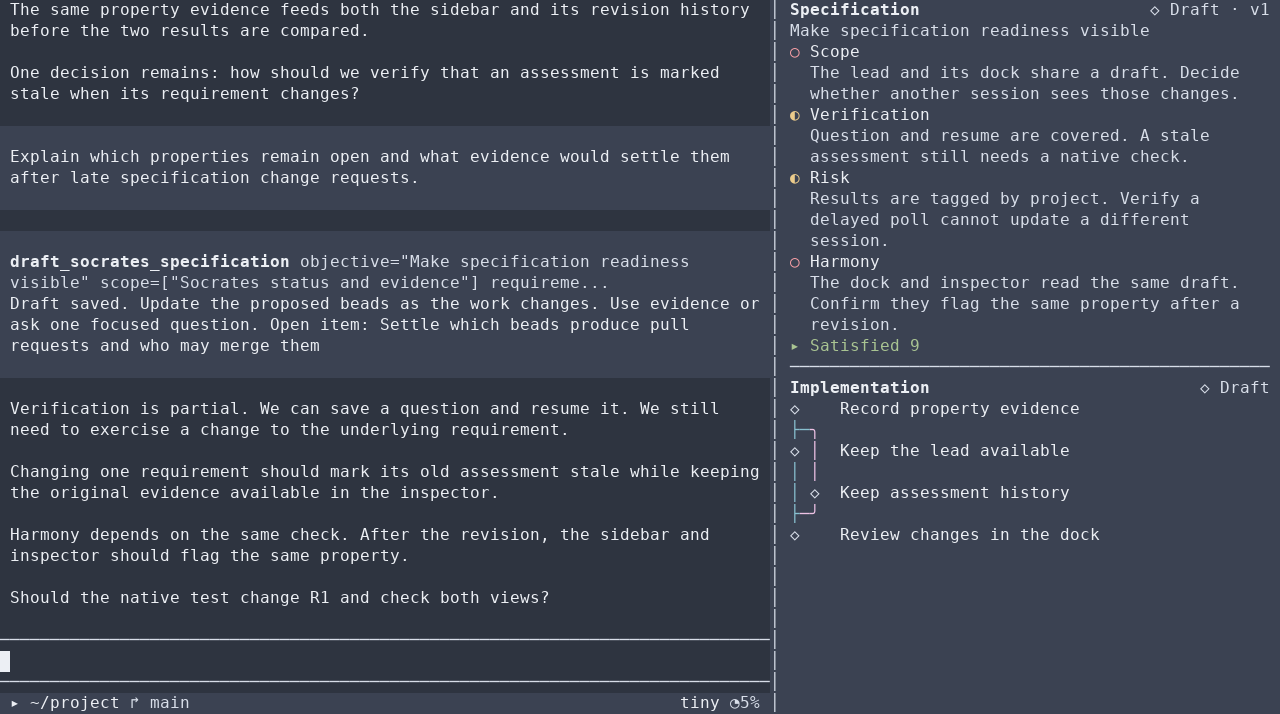
The conversation stays visible, but it is no longer the only place to find the state of the work. Studio puts the specification’s open properties beside the transcript, so an unanswered question or stale assessment does not get lost in a wall of messages.
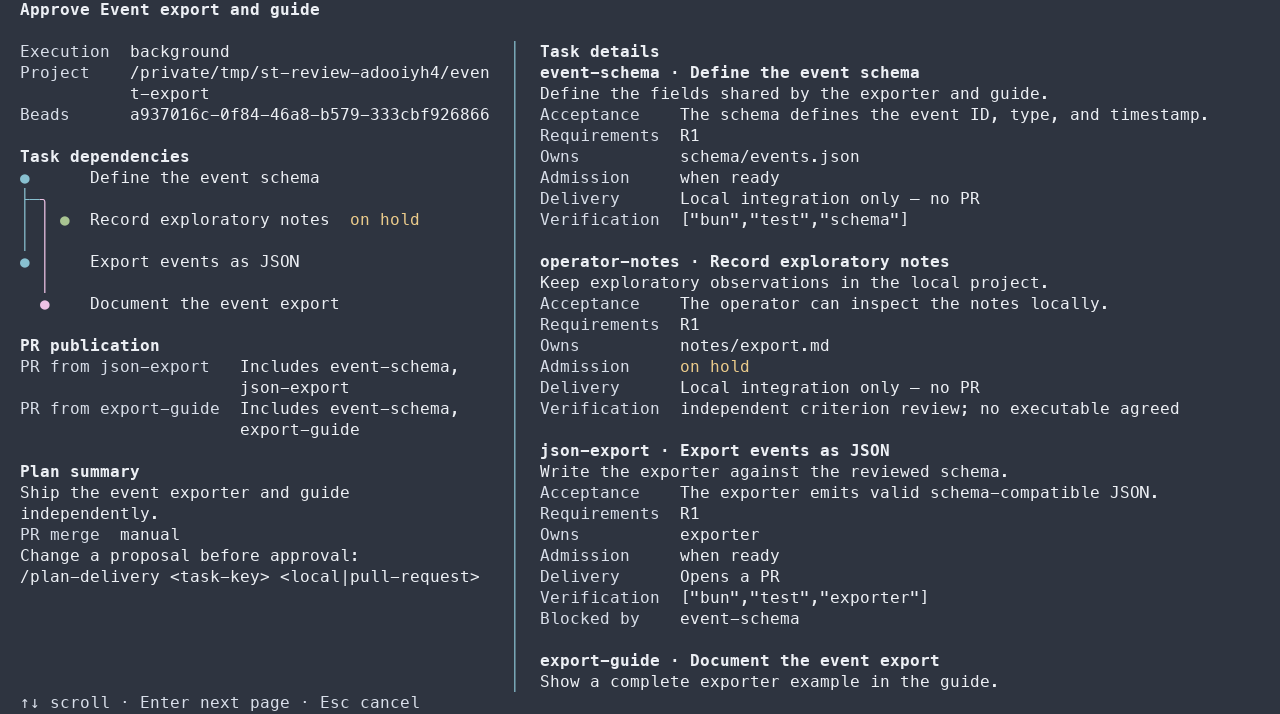
Before work runs, the approval view puts task dependencies, delivery choices, and verification arguments in one inspection surface. That is where a person can notice that the plan is incomplete or that a child task is going to publish something it shouldn’t.
Follow one change
Suppose I ask Studio to change how a tool handles an interrupted operation. We can investigate the current behavior, decide what should happen after an uncertain result, and make those decisions explicit before anything is dispatched.
The approved plan becomes tasks. Producer selects eligible work and starts a worker. Stagehand gives that worker an isolated checkout and preserves its ownership, including when a process fails in a way that leaves the outcome uncertain. A second attempt shouldn’t silently inherit the first attempt’s files.
The worker can produce an implementation and passing tests. That is useful evidence, not the whole answer. Review still has to ask whether the implementation matches the decision, whether the tests exercise the failure, and whether the code is understandable. If the plan calls for a PR, Publisher sends the change to GitHub and brings subsequent feedback back to the owning work. The conversation survives the handoff.
Publisher: review has a return address
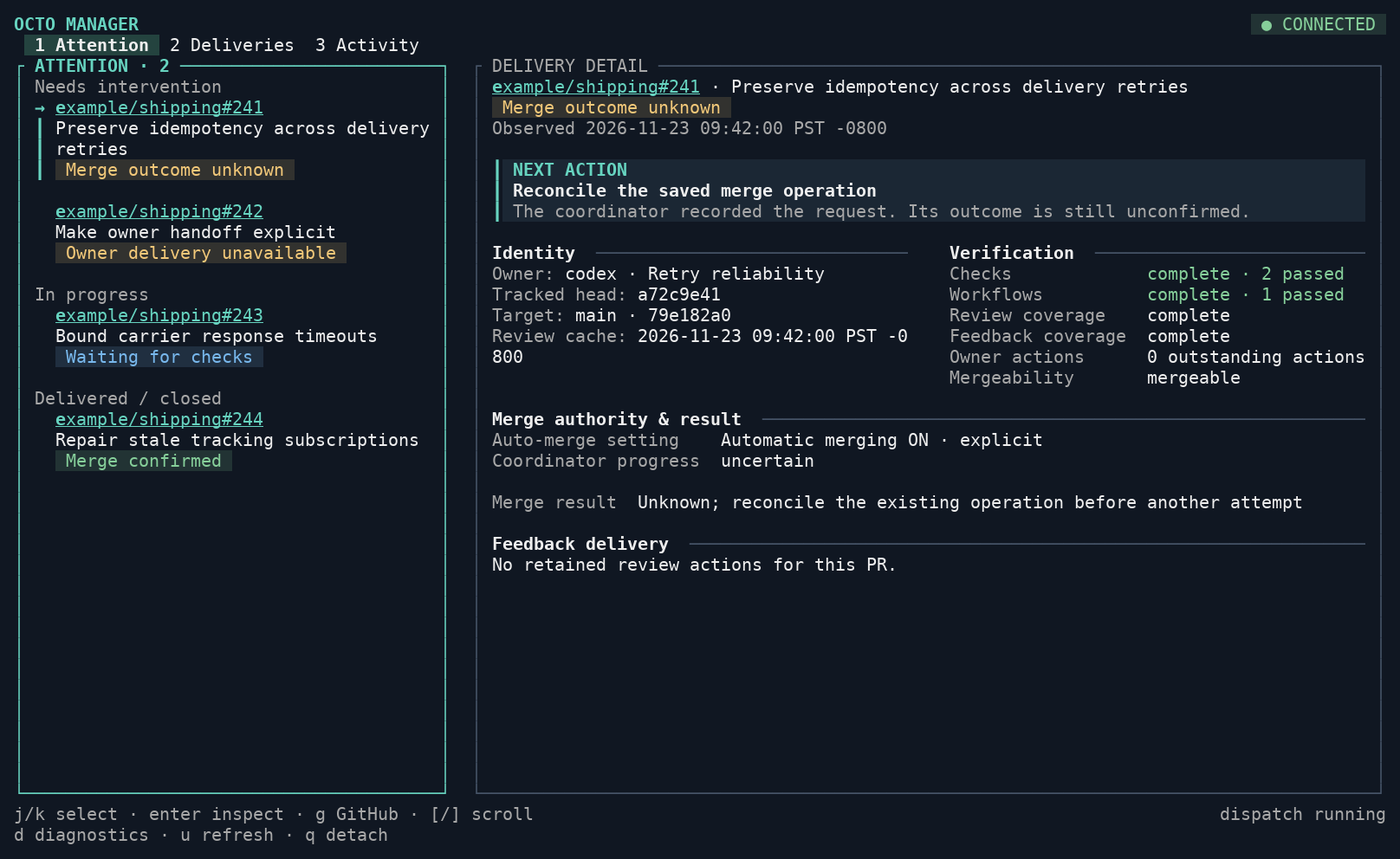
Publishing a PR is the start of another feedback cycle. The dashboard puts deliveries needing intervention ahead of routine progress. Selecting one reveals the next safe action, the available check and review evidence, and whether a merge has actually been confirmed.
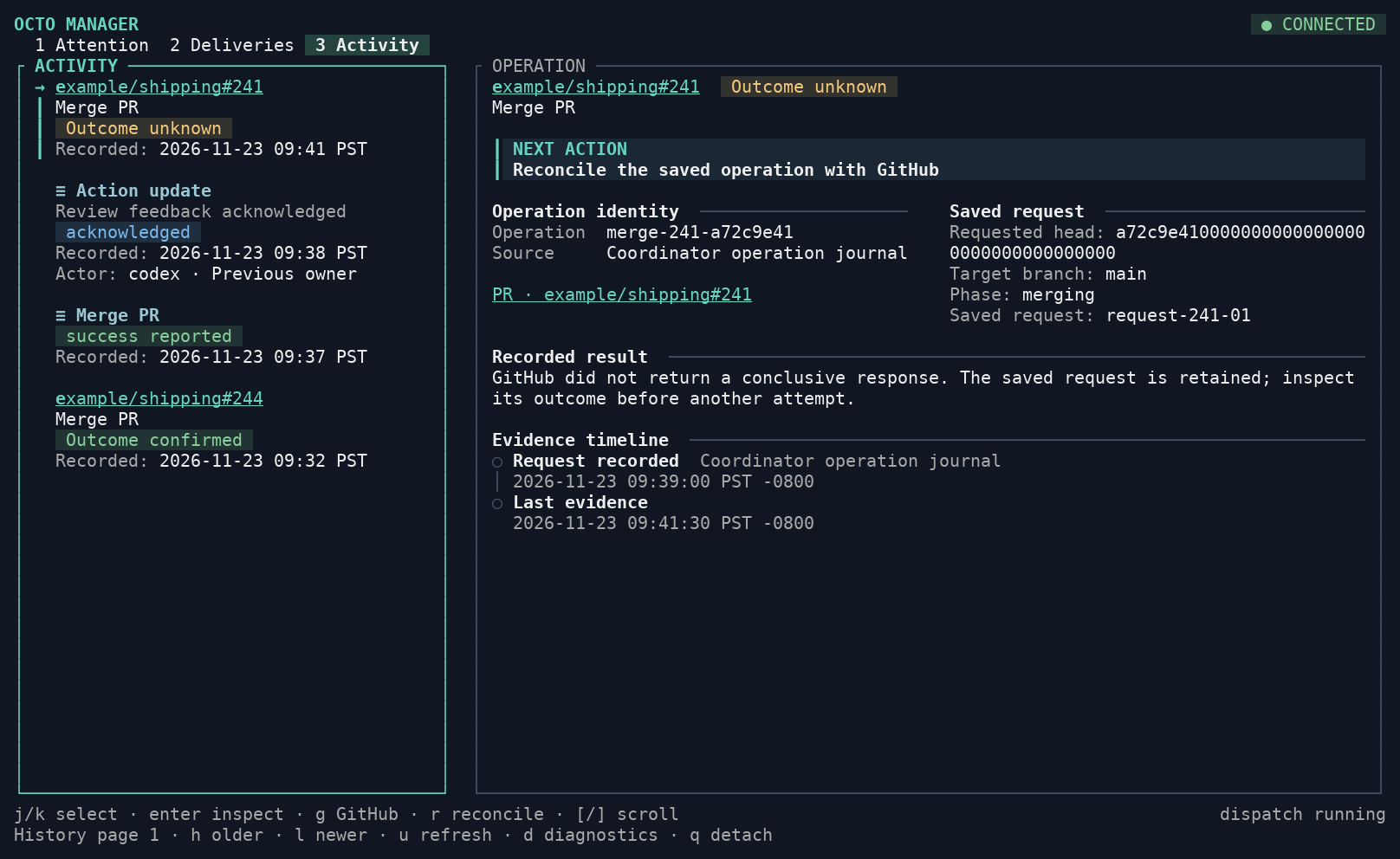
The activity view exposes a different distinction: requesting an operation is not the same as knowing its result. When GitHub’s answer is uncertain, Publisher retains the saved request and its evidence. The next action is to reconcile that operation, not blindly run it again.
Neovim stays where editing happens
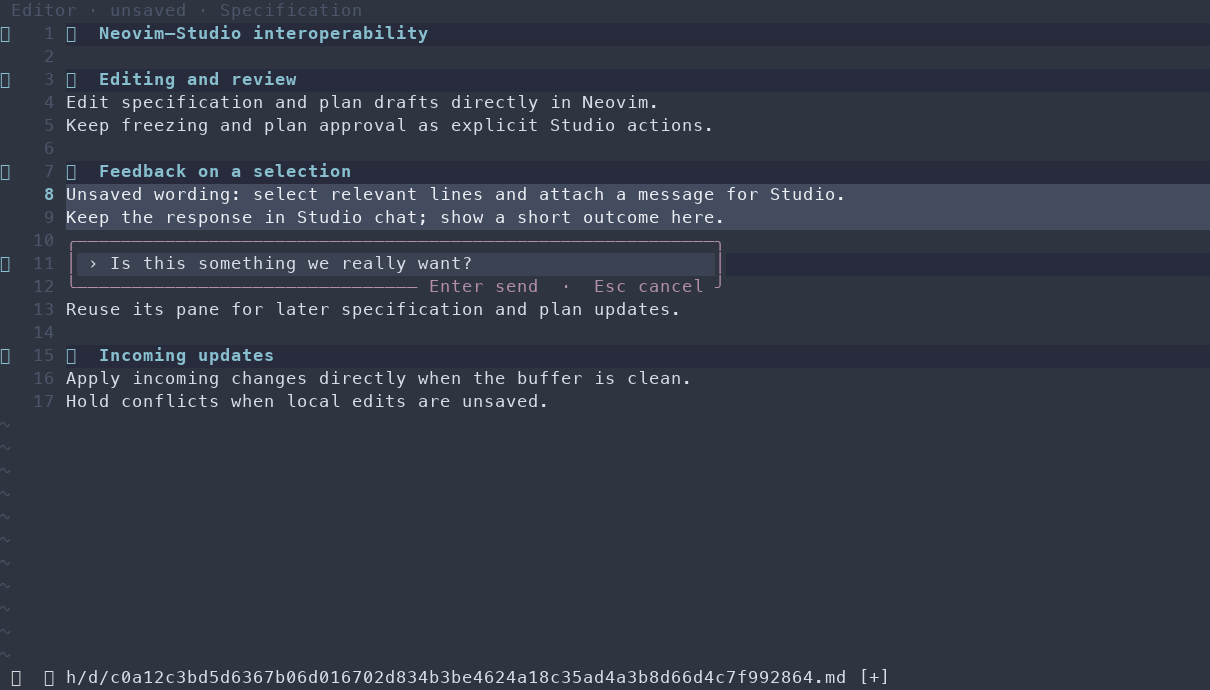
Copydesk came from a specific friction: I wanted to discuss a specification in Studio but edit the document in Neovim. A chat transcript is useful for decisions; it is a poor substitute for text objects, selections, buffers, and diffs.
With the editor bridge, Studio keeps document authority while Neovim handles the editing experience. Saving a buffer submits a revision-checked change. Selecting lines and adding a comment sends feedback to the owning conversation, even if the selection contains unsaved edits. If an agent changes a document while I’m editing, the local text must remain available for comparison rather than being overwritten.
That boundary is also useful beyond Studio. The editor integration doesn’t need to know how the host schedules tasks, stores approvals, or runs its model.
Passing is not the final pass
Coding agents have become good at reaching a working result. They are less reliable at producing code that another person will want to maintain.
I want the workflow to separate three questions: does the change work, can someone understand it, and is it fast enough? Tests answer part of the first. A deliberate readability review should examine names, control flow, abstractions, and whether the implementation is larger than the problem. Performance comes after we know which behavior and structure we intend to keep.
An independent readability pass is a direction I’m developing, not a claim that every Studio task already runs one. An agent saying “done” is not the same thing as accepted work.
The tools and their boundaries
Producer is a responsibility inside Studio, not a separate released project. The other three names are decisions in progress: Stagehand, Copydesk, and Publisher still have repositories or commands under their former names. The diagram shows the intended division of labor; individual integrations are at different stages of completion.
The aim is not to remove the person from the process. It’s to make substantial agent work easier to start, inspect, interrupt, revise, and finish without losing who decided what or why.
| Name | Responsibility | Current source |
|---|---|---|
| Studio | Conversation, specification, approval, and working interface | Studio |
| Producer | Execution, verification, and attempt recovery | Studio runtime |
| Stagehand | Worktree allocation, protection, inventory, and cleanup | Worktree Manager |
| Copydesk | Neovim editing and feedback for host-owned documents | Editor Interop |
| Publisher | GitHub PR publication, checks, reviews, and delivery | Octo Manager |