Command palette
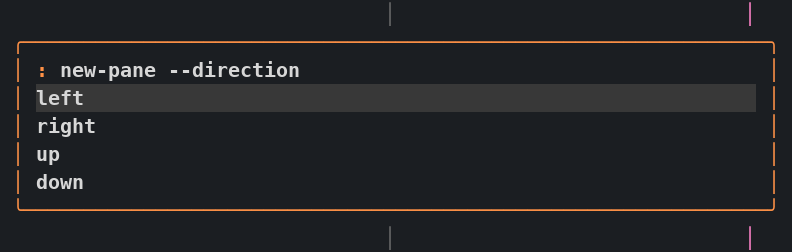
Press Ctrl-f : to open a slim floating command line. Type a Zellij action without the zellij action prefix. Up to five suggestions appear below the input, and the popup shrinks as matches narrow. Use the arrow keys to select a suggestion and Tab to complete it. Enter runs the command you entered; selecting a suggestion never runs it. Esc or clicking outside cancels; an empty command closes it too.
The command line is centered horizontally near the upper part of the terminal and stays in place as suggestions change. It is separate from the shared popup and leaves hidden floating panes hidden.
Examples
Section titled “Examples”rename-tab "work notes"new-pane --direction rightnew-pane --floating -- htopmove-focus leftresize increase rightCompletion and editing
Section titled “Completion and editing”Suggestions include actions and descriptions, native flags and their accepted values, and live targets. For example, new-pane --dir completes to new-pane --direction, then offers directions. rename-tab offers the current name for editing. go-to-tab-name , focus-pane-id , and switch-session suggest live tabs, panes, and running sessions. Names containing spaces are quoted automatically.
Ctrl-u clears before the cursor, Ctrl-k clears after it, and Ctrl-w deletes the previous word. Pasting edits the line without submitting it. Parse errors leave the command available to correct; Ctrl-d opens the full error, and Esc returns to editing.
Help and history
Section titled “Help and history”Type help for a searchable action picker. Selecting an action fills the input so you can edit it before running it. Add --help to an action to view its native documentation. Enter or Esc returns to the command.
Type history or press Ctrl-r to search this client’s recent commands. The selected command returns to the input for review before it runs. Ctrl-p and Ctrl-n recall older and newer commands, restoring your unsubmitted draft when you return to the end. Up from an empty input also recalls history. The last 32 distinct commands stay in memory until the plugin or session restarts.
Find a live target
Section titled “Find a live target”Run list-panes, list-tabs, or list-sessions to open a searchable table. Type to filter, use the arrows to select a row, and press Enter to jump to it. Esc returns to your original command. The tables refresh as live state changes. Help, history, and target tables expand only while open; returning to command entry restores the compact view.
Displayed tab positions are zero-based, matching the bar. The native go-to-tab command still takes a one-based index, shown in its completion details. Use go-to-tab-by-id for a stable tab ID.
Scope and setup
Section titled “Scope and setup”This prompt runs Zellij actions, not shell commands. Quotes group arguments, but $HOME, pipes, wildcards, and command substitution are not expanded. To start a program, use an action such as new-pane -- htop.
The three target-list commands take no flags. Use a normal terminal for JSON output, layout-file loading, external plugin installation, and CLI-only pane-relative or explicit-ID action variants. The native action API does not return all runtime errors, so submission alone does not confirm that an action succeeded.
The palette needs the managed modern configuration and matching pinned runtime. After updating the checkout, install the runtime with bash scripts/install-zellij, rebuild with make zellij-command-prompt, apply make zellij, and save your work before restarting the session. Existing installations may ask for expanded plugin permissions. The matching runtime keeps pasted text in the requesting client’s popup and preserves Unicode input.